

Skip to content
Tuesday, Nov 18, 2025
ICT BYTE Logo

ICT BYTE

Tech News in Nepal | #1 Tech Blog

  • HOME
  • GADGETS
    • MOBILE
    • LAPTOPS
    • SMARTWATCH
    • TABLETS
  • EVENTS
  • NEPAL
    • Banking
    • B.Sc. CSIT
    • BCA
  • MCS
    • 1st Sem
      • Managerial Communication
      • Object Oriented Programming
      • Open Source Technology
      • Design and Analysis of Algorithm
    • 2nd Sem
    • 3rd Sem
    • 4th Sem
  • Hult Prize
  • Utility Tools
  • Home
  • TIPS
  • How to deactivate an Instagram account?

How to deactivate an Instagram account?

byBipisha Bajracharya

Last Updated on 5 years by Sumi

Instagram has become an important part of our social media life. It was a platform where we could share pictures with our friends and family. But now this platform has been offering so much more. But sometimes we need a break from all the scrolling down and double-tapping. So, today we will be talking about how to deactivate an Instagram account.

While deactivating the account you will get to options to temporarily deactivate the account or permanently ie deleting the account. If you want to quit from social media then go for deleting the account option. However, by doing this you will lose all the pictures and videos that you have uploaded or saved. Moreover, save the photos and videos before deleting the account.

How to deactivate an Instagram account?

Instagram

Here is a step by step process of how to deactivate your Instagram account.

  • Open your account from a desktop or mobile browsers. Keep in mind that you cannot deactivate the account with the app. Login to your account by trying your Instagram id and password.
  • After logging into your Instagram open your profile. Then click and the edit profile option. The option is located below or at the side of your user’s name.
  • Next scroll down and at the right side, you will see “ temporarily disable my account“option. Click on that.
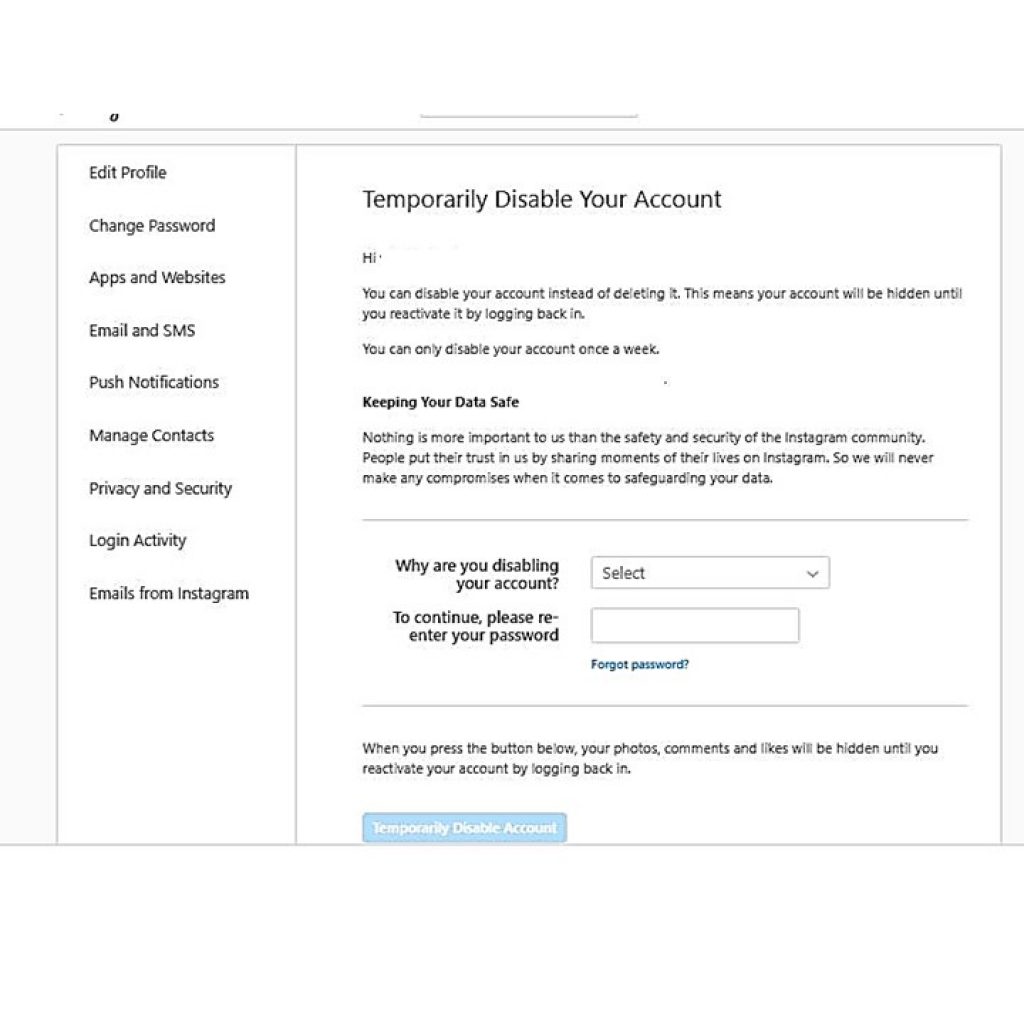
Deactivation an Instagram Account
  • After you have clicked the option it will take you to the page. There you have to select an option on “Why are you disabling your account“.
  • Then selecting the reaction of disabling the account you have to re-enter your password again.
  • Finally, click on the “Temporarily Disable Account” button to complete the process.

Your account along with your photos and videos will be hidden until you activate your account. Likewise, to reactivate your account you just have to log in to your Instagram account.

Also check out: How to make “Besar Photo”?| Use PhotoLab Picture Edito

Share this:

  • Click to share on Facebook (Opens in new window) Facebook
  • Click to share on X (Opens in new window) X
How ToTIPSTechnologySocial
Tagged deactivate an Instagram account, Insta account deactivate, Instagram

Post navigation

Google Photos gets a redesign, new logo, and new maps feature
How to use custom background on Skype, Zoom and Microsoft Teams video call

Related Posts

Nepal’s Cybersecurity Pioneers Shine on Global Stage: Cryptogen Nepal and Green Tick Nepal Secure Top Spots in MSSP Alert’s 2023 Top 250 List

Last Updated on 2 years by ICT BYTE In a recent release, MSSP Alert, the renowned global evaluator of cybersecurity…

Share this:

  • Click to share on Facebook (Opens in new window) Facebook
  • Click to share on X (Opens in new window) X
tiktok time
Microsoft to buy TikTok

Last Updated on 5 years by Sumi Trump recently expressed his plans to ban TikTok in the U.S. After that,…

Share this:

  • Click to share on Facebook (Opens in new window) Facebook
  • Click to share on X (Opens in new window) X
vianet prices
Vianet Internet and ViaTV Prices in Nepal

Last Updated on 5 years by Sumi Vianet is one of the popular Internet Service Providers in Nepal which was…

Share this:

  • Click to share on Facebook (Opens in new window) Facebook
  • Click to share on X (Opens in new window) X

Copyright © 2025 ICT BYTE | Expose News by Ascendoor | Powered by WordPress.