

Last Updated on by Samita KC
Finding trending topics on Google is a critical skill for content creators, marketers, bloggers, and businesses who want to stay relevant and boost online visibility. Creating content based on what people are actively searching for not only increases organic traffic but also improves search rankings, engagement, and overall website authority. Staying ahead of the curve in content creation starts with finding trending topics on Google. Whether you are a blogger, marketer, or social media manager, knowing what’s currently popular can boost traffic and engagement. In this guide, we’ll explore simple and effective ways to uncover trending topics using Google’s tools.
In this comprehensive guide, we’ll cover 7 actionable methods to find trending topics on Google, complete with examples, step-by-step instructions, and tips to maximize SEO performance.
alt text: Finding trending topics on Google using Google Trends

Why Finding Trending Topics Matters
Trending topics are search queries or subjects that are currently popular among users. By targeting trending topics, you can:
- Produce relevant and timely content
- Attract high-intent organic traffic
- Improve search engine rankings faster
- Engage your audience effectively
- Gain a competitive edge in your niche
Google prioritizes content that is fresh, relevant, and high-quality. Ignoring trends can make your content invisible or outdated, even if it’s well-written.
Pro Tip: Even evergreen content benefits from trend integration. For example, if you write a “Digital Marketing Guide 2025,” referencing trending tools or topics in your content will make it more relevant and shareable.
1. Use Google Trends to Discover Popular Searches
Google Trends is one of the most powerful free tools for discovering trending topics. It shows search interest over time, rising and breakout keywords, and regional popularity.Google Trends is a powerful tool for finding trending topics on Google. You can explore what people are searching for globally or within specific regions. Simply enter your niche or keywords, and Google Trends will display search volume patterns and trending queries.
Step-by-Step Guide:
- Open Google Trends.
- Select your country or choose “Worldwide” to see global trends.
- Set a time range: last 24 hours, 7 days, 30 days, 12 months, or even 5 years.
- Explore trending searches or enter a keyword to see interest over time.
- Use filters like category (e.g., Business, Technology, Health) to narrow down results.
- Compare multiple keywords to identify which topics are gaining momentum faster.
Example:
Searching for “AI tools” and “ChatGPT alternatives” in Google Trends might show:
- “ChatGPT alternatives” is rising in 2025
- “AI tools” has a steady search volume
This data allows you to choose content topics with higher interest potential.

Tips for SEO Optimization:
- Focus on “Breakout” keywords—they indicate sudden spikes in popularity.
- Look at regional interest if targeting a specific location.
- Combine multiple related keywords for blog headings or YouTube titles.
2. Leverage Google Search Autocomplete
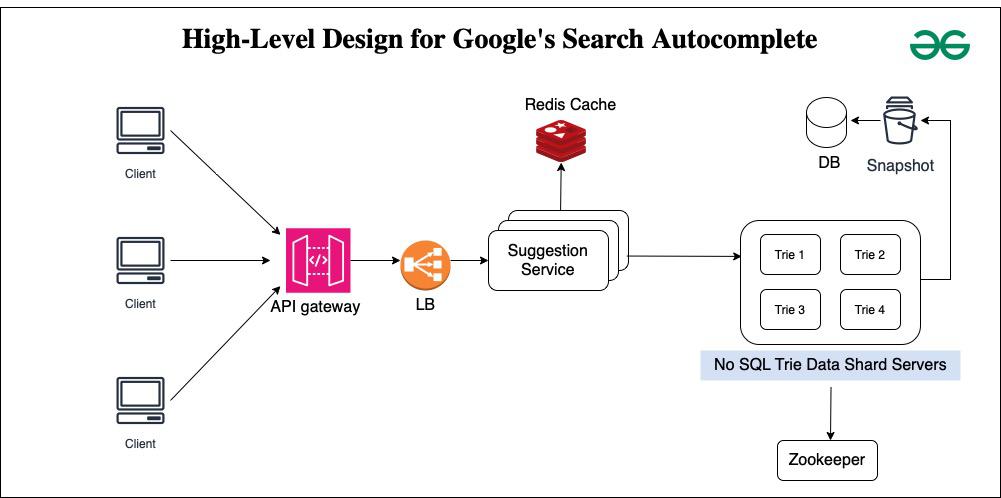
Google Search Autocomplete suggests trending and popular searches based on what users type. This feature provides real-time insight into user behavior.
Step-by-Step Guide:
- Go to Google Search.
- Start typing your base keyword. For example: “Digital marketing.”
- Observe the suggested autocomplete phrases.
Example Suggestions:
- digital marketing trends 2025
- digital marketing strategy
- digital marketing for beginners
- digital marketing tools
Why This Works:
- Autocomplete reflects current search demand.
- Helps generate blog post ideas, social media captions, and video topics.
Advanced Tip:
Try adding modifiers like:
- “How” → how to start digital marketing
- “Best” → best digital marketing tools
- “Tips” → digital marketing tips 2025
3. Analyze the “People Also Ask” (PAA) Section
The People Also Ask box in Google search results lists frequently asked questions related to your query.
Why It’s Useful:
- Reveals user intent
- Generates subheadings for your content
- Improves chances of ranking in featured snippets
Step-by-Step Guide:
- Search for your keyword in Google.
- Scroll to the PAA box.
- Review questions related to your topic.
Example:
Search: “Content marketing”
People Also Ask questions:
- Why is content marketing important?
- How does content marketing work?
- What are the best content marketing strategies?
You can structure your article using these questions as H2 or H3 subheadings, improving relevance and readability.
Pro SEO Tip:
Answer PAA questions concisely (40–60 words) at the beginning of your section. Google often uses this content for featured snippets.
4. Check Related Searches for Keyword Expansion
At the bottom of Google search results, you’ll find Related Searches, which shows trending variations of your topic.
Why It Helps:
- Expands your long-tail keyword strategy
- Enhances content depth
- Improves topical relevance
Example:
Search: “SEO tools”
Related searches include:
- free SEO tools
- best SEO tools 2025
- SEO tools for beginners
- advanced SEO software
How to Use:
- Include 1–2 related searches naturally in your headings or paragraph content.
- Target long-tail variations in blog subheadings to cover a wider search intent spectrum.
Pro Tip:
Combine autocomplete suggestions with related searches for high-potential blog topics.
5. Explore Google News for Breaking Trends
Google News is a hub for real-time trending stories and emerging topics.

How to Use:
- Go to Google News.
- Browse categories: Technology, Business, Entertainment, Health, Science.
- Filter by “Latest” or your target location.
- Identify trending articles and headlines.
Example:
If you are writing about AI, Google News might show recent updates on AI regulations, new AI tools, or AI research breakthroughs.
Benefits for Content Creation:
- Ideal for timely blog posts, social media updates, or newsletters.
- Early coverage can generate high traffic before competition increases.
Pro Tip:
Combine news insights with your own analysis or opinion to create unique, shareable content.
6. Identify Seasonal and Evergreen Trends
Not all trends are temporary. Some are seasonal or evergreen and provide long-term content opportunities.
How to Track:
- Use Google Trends with 12-month or 5-year filters.
- Look for recurring spikes during holidays, events, or industry cycles.
Example:
- “Online courses” peaks during academic enrollment periods.
- “Fitness tips” spike every January.
- “SEO tools” steadily grow over time (evergreen).
Strategy:
- Publish seasonal content 1–2 weeks before peak trends.
- Keep evergreen content updated with the latest insights.
Pro Tip:
Combine trending and evergreen content to maintain both short-term traffic spikes and long-term SEO performance.
7. Combine Trending Topics with SEO Optimization
Finding trending topics is only half the work. SEO ensures that your content reaches the right audience.

Best SEO Practices:
- Include the focus keyword naturally in the title, first paragraph, and subheadings.
- Optimize meta title and meta description with trending terms.
- Use internal links to other relevant articles.
- Include external authority links to increase credibility.
- Add images with ALT tags containing keywords.
- Structure your content with numbered lists, bullets, and headings for readability.
- Publish content while the trend is active.
Pro Tip:
Use tools like Rank Math or Yoast SEO to ensure proper keyword density, readability, and meta optimization.
Common Mistakes to Avoid
- Chasing irrelevant trends
- Ignoring user intent
- Keyword stuffing or over-optimization
- Copying competitors without adding value
- Delaying publication on trending topics
Pro Tip: Always combine trends with original insights or case studies for better engagement and SEO performance.
Internal Links:
10 Google cool tricks that you’d love to know — https://ictbyte.com/tips/10-google-cool-tricks-that-youd-love-to-know
What Nepali people searched most in Google during COVID — https://ictbyte.com/nepal/what-nepali-people-searched-most-in-google
Recommendation External Links to Authoritative Sources
Google Trends → https://trends.google.com
Google News → https://news.google.com
HubSpot SEO Guide → https://blog.hubspot.com/marketing/seo
Mini FAQ Section
Q1: How do I find trending topics on Google for free?
A1: Use tools like Google Trends, Autocomplete, People Also Ask, Google News, and Related Searches. All are free and provide real-time insights.
Q2: Can I use trending topics for evergreen content?
A2: Yes. Identify long-term interest topics using Google Trends’ 12-month or 5-year filters. Update evergreen content with current trends.
Q3: How often should I check for trending topics?
A3: For blogs, weekly checks are enough. For news or social media content, daily monitoring is recommended.
Q4: Do trending topics guarantee traffic?
A4: Not always. Proper SEO optimization, quality content, and timely publication are also crucial.
Conclusion
Learning how to find trending topics on Google is essential for anyone creating content in 2025. By using Google Trends, Search Autocomplete, People Also Ask, Related Searches, and Google News, you can consistently discover high-demand topics that attract traffic, boost engagement, and improve SEO.Google Search Autocomplete suggests trending searches based on what users type. This provides real-time insight into user behavior and helps in finding trending topics on Google.
When you combine trend research with strong on-page SEO practices, including focus keywords, meta optimization, internal linking, and structured content, your articles have a higher chance of ranking on Google and staying relevant for longer.
Trending topics, when used wisely, give your content both short-term visibility and long-term SEO authority.