Skip to content
Monday, Nov 17, 2025
ICT BYTE Logo

ICT BYTE

Tech News in Nepal | #1 Tech Blog

  • HOME
  • GADGETS
    • MOBILE
    • LAPTOPS
    • SMARTWATCH
    • TABLETS
  • EVENTS
  • NEPAL
    • Banking
    • B.Sc. CSIT
    • BCA
  • MCS
    • 1st Sem
      • Managerial Communication
      • Object Oriented Programming
      • Open Source Technology
      • Design and Analysis of Algorithm
    • 2nd Sem
    • 3rd Sem
    • 4th Sem
  • Hult Prize
  • Utility Tools
  • Home
  • TIPS
  • How to completely delete a Facebook account?

How to completely delete a Facebook account?

byBipisha Bajracharya
delete facebook account

Last Updated on 5 years by Sumi

Facebook has been helpful to many for us by letting us be in touch with our friends and family. Likewise, for many people, it has helped to grow their business. However, in recent years, Facebook has been accused of using or giving private information of its user to other people or business. By listening to these kinds of news, many people wanted to delete their Facebook account.

delete FB account

If you are one of those people who wants to permanently delete their account then continue reading. The Facebook gives you two options, either deactivate your account for some period of time or delete the account permanently.

Before deleting your account completely, download your information first. As completely deleting your count leads to deleting all the information and pictures that you have on FB. Here are the steps to completely delete your Facebook account.

Steps to completely delete a Facebook account

Step 1: Open your facebook account from desktop or Mobile phone.

Step 2: Click on the arrow-like button on the top right. Then click on “Settings and Privacy” and go to settings.

On mobile phone, tap on the 3 striped button and scroll down. After that tap on “Settings and Privacy” and go to settings.
How to completely delete a Facebook account?

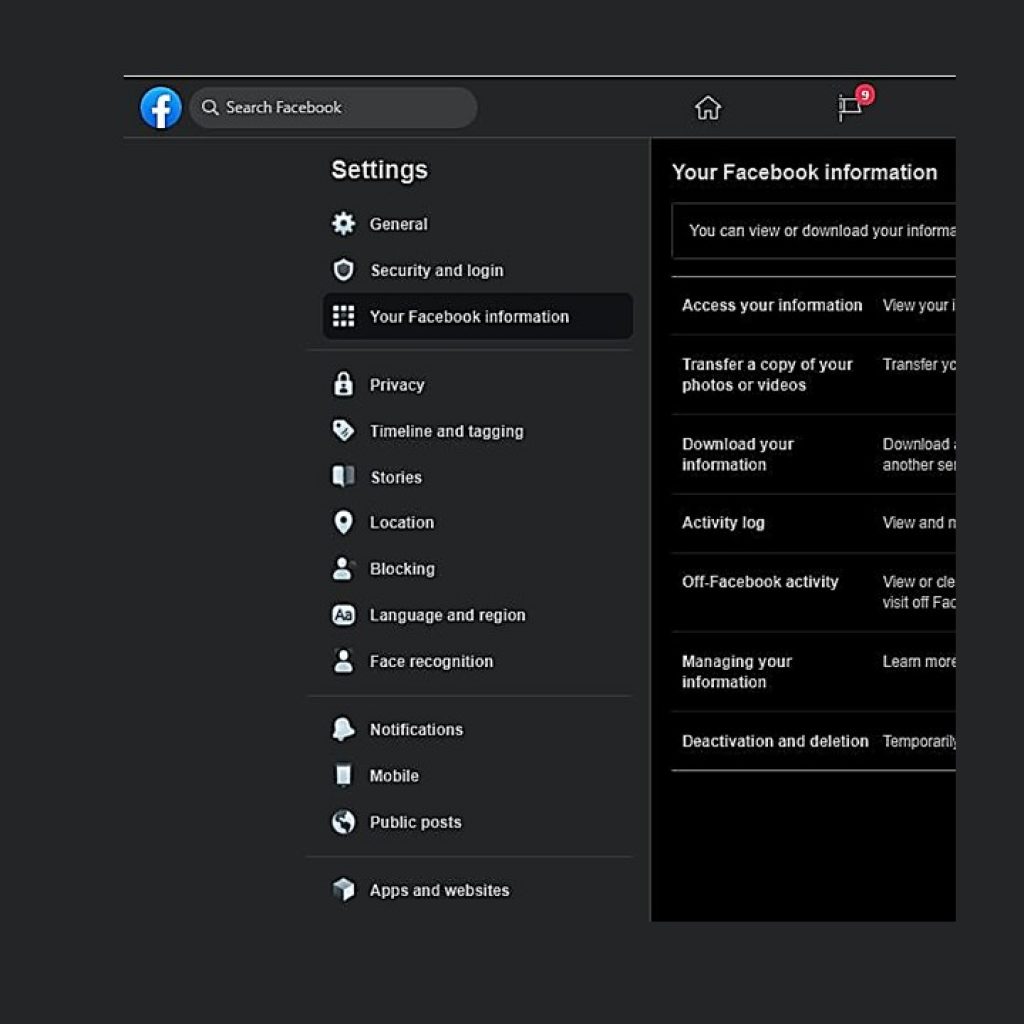
Step 3: Click on “Your Facebook Information” which is in the left column.

On mobile phone, scroll down and when you see Your Facebook Information, tap on “Account ownership and control” option.

Step 4: Click View on “Deactivation and Deletion“. Or you can just click on Deactivation and Deletion.
How to completely delete a Facebook account?

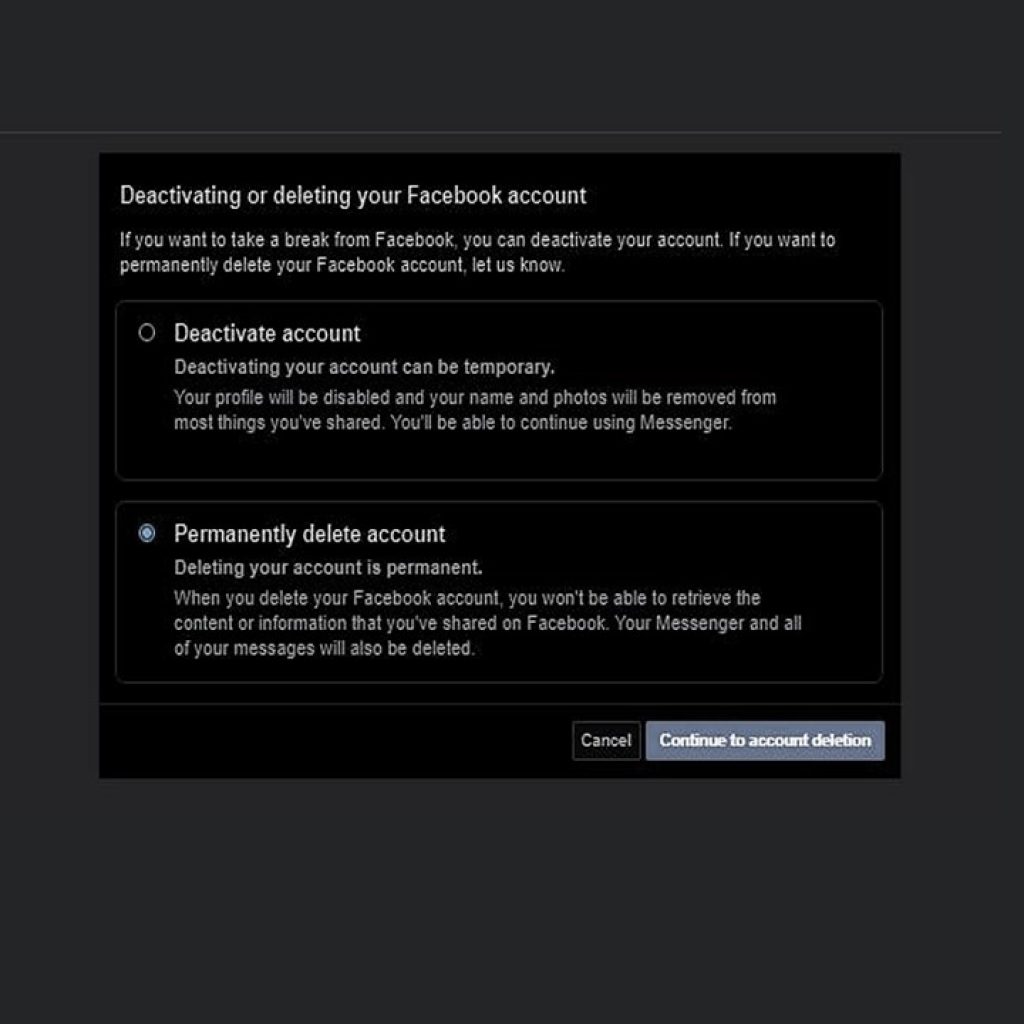
Step 5: Choose Permanently Delete Account, then click Continue to Account Deletion. After that, FB will ask if you want to download your information.

If you want to download your information click on Download Info.

Step 6: Click on Delete Account. You have to enter your password and then click Continue.

If you log in to your account in less than 30 days, the deleting process will be cancelled. Likewise, after 30 days all the information will be permanently deleted.

Also check out: How to download videos from YouTube and Facebook?

Share this:

  • Click to share on Facebook (Opens in new window) Facebook
  • Click to share on X (Opens in new window) X
How ToSocialTIPSTechnology
Tagged How to delete FB account permanently?, Delete Facebook Account, Completely delete FB account

Post navigation

Reasons behind TikTok and mobile apps banned in India. Is it a good solution?
How to use TikTok in India| After banded Tiktok In India

Related Posts

Keyword Research
4 Joyful Truths: Why Keyword Research Makes Content Shine Online

Last Updated on 2 months by ICT Byte The Internet is a vast and continuously growing source of information and…

Share this:

  • Click to share on Facebook (Opens in new window) Facebook
  • Click to share on X (Opens in new window) X
google core update
Google May 2020 Core Update rolling out

Last Updated on 6 years by Sumi Google announced that it is rolling out a new core update, the May…

Share this:

  • Click to share on Facebook (Opens in new window) Facebook
  • Click to share on X (Opens in new window) X
unblocked music sites
10 Best Free Unblocked Music Sites to Listen to Music in 2025!

Last Updated on 10 months by ICT Byte Are you Looking for the best unblocked music sites? In today’s digital…

Share this:

  • Click to share on Facebook (Opens in new window) Facebook
  • Click to share on X (Opens in new window) X

Copyright © 2025 ICT BYTE | Expose News by Ascendoor | Powered by WordPress.