

Last Updated on by Akshyata Karki
Nepal is slowly stepping in the digital field one of its signs is the banking sector. Before you needed to visit the bank to open an account but now you can open it at your house. One such example is Mega bank, You can Open Mega Bank Online Account by sitting at your home. To open Open Mega Bank Online Account just follow the steps below:
Steps to open Mega bank online account opening
1. First go to this link of Mega Bank
2. Choose the suitable account which you want to open and click Open Account
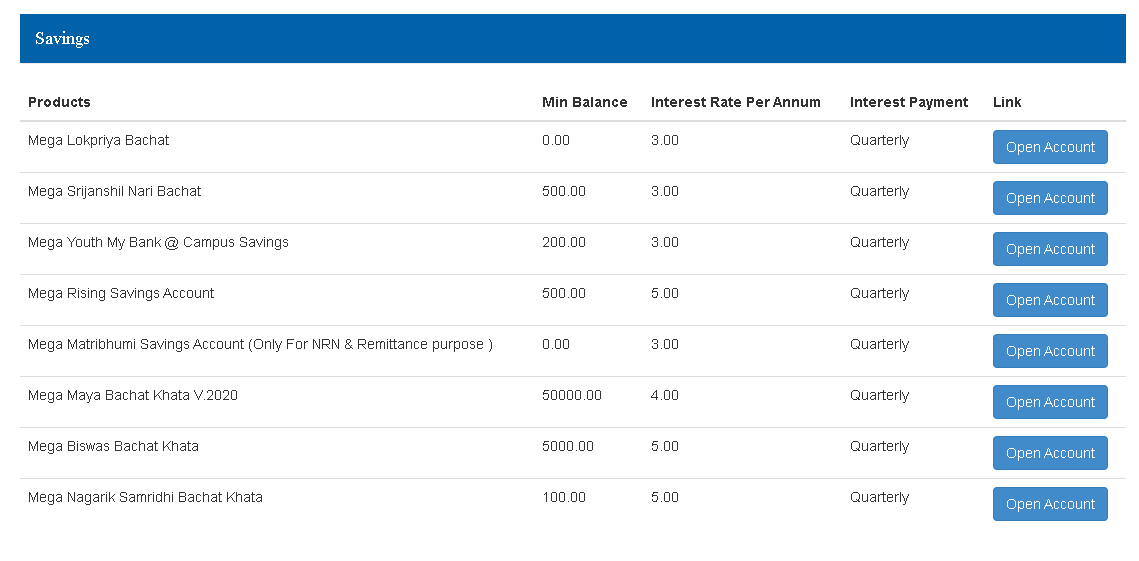
3. Mega bank account opening form opens
4.You need to complete all details in Capital letter and strike out the non applicable boxes
5. Select the name of the branch where you want to open your account
6. Then you need to fill the form with your proper details.
- Account Type
- Minor Account
- Currency
- Joint Account
Note: if you are opening for minor then select ‘Yes’. You can choose joint account option between (B) and (C) else select No to open sole account.
- Sole Applicant / Joint Applicant (A)
- Title
- First Name
- Middle Name
- Last Name
- Gender
- Family Information
- Grandfather’s name
- Father’s name
- Mother’s name
- Spouse name
- Personal Details
- Nationality
- Date of Birth
- Identification document
- Location issued
- Document issue date
- Marital status
- Occupation Details
- Income
- Occupation
- Contact Information
- Contact number
- Email address
- Phone number
- Permanent And Current Address
- Country
- Current zone
- Current district
- Permanent Zone
- Permanent district
- Local Contact Person (For Non-resident customer)
- Title
- Name
- Phone number
- Address
- Other Required services
- Statement
- Debit Card
- E-banking
- Add Nominee
- If yes then provide nominee details else select No
- Upload Documents
- Identification document
- Citizenship Certificate or Passport
- Notarized NRN Card ( for NRN only )
- Source of FCY earning a certificate (for foreign currency account)
Related: Open online account in Sunrise Bank
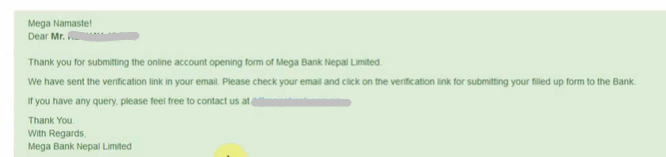
After completing, Tick the I accept box and fill the captcha, then submit. After that, you will see a green success dialogue box. Then go to your mail and then check for the verification mail and click the link in the mail. Then new online account request is sent to the bank and your account will be created after the bank’s response.
Thus by following these steps you can open an Open Mega Bank Online Account And Get A Mega Bank Account Number.